Owner-approved quoting
Every quote waits for your OK.
Gus gets the job details and lines up the quote. You check the price and approve it. Only then does your customer get one link to accept and pay.
How a quote goes out.
Gus gets the details
Your customer describes the job on your website. Gus asks the follow-up questions, but never names a price. Pricing is your call.
You check and approve
The quote waits in your dashboard. Nothing goes to the customer until you approve it, and Gus flags anything that looks off.
Your customer accepts and pays
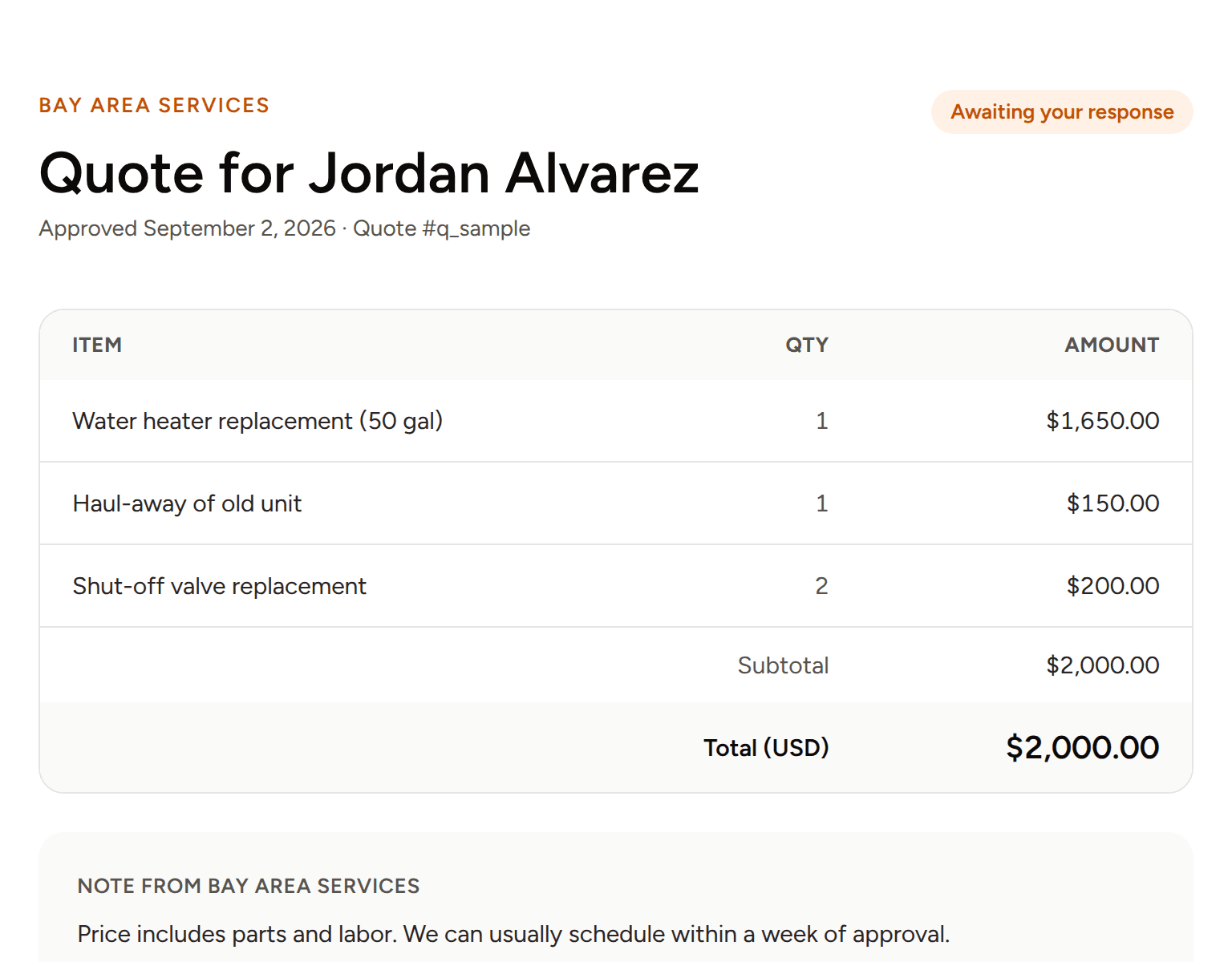
Once you approve, the customer gets one link to see the quote, accept or decline, and pay.
Your price, their accept button.
This is what your customer sees after you approve. The business in the picture is a sample.
Try it
See it on a demo we built.
Larkspur is a made-up landscaping company. Gus works the same way for any trade. Its reviews and details aren't real. Ask for an estimate as a customer, then see the owner side.
Questions
- No. Automatic sending is switched off. Every quote waits until you approve it. If you'd like Gus to send quotes automatically from prices you set, we'll set that up for you, and you can keep approval on any time.
- Gus tells them you'll confirm pricing when you review their request. He doesn't guess.
- One link. They can see the quote, accept or decline it, and pay. They don't need an account or an app.
- Not always. We'll look at what you use on the call and tell you honestly.